
LinkedIn

Subscribe to our news

CIMIC
  • Our Group
  • Projects
  • Innovation
  • Sustainability
  • Careers
  • News & media

CIMIC / OpCo logo

To update the logo:

  1. In Content Editor, navigate to: <Opco Site> [Node] / Data [Node] / Images [Node] / HeaderLogo [Node], e.g. CPB / Data / Images / HeaderLogo.
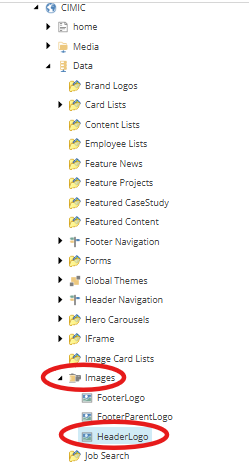
  2. In the Image field, click Clear to remove the existing logo in the field and click Browse.

  3. Find and select the replacement logo from the media library.
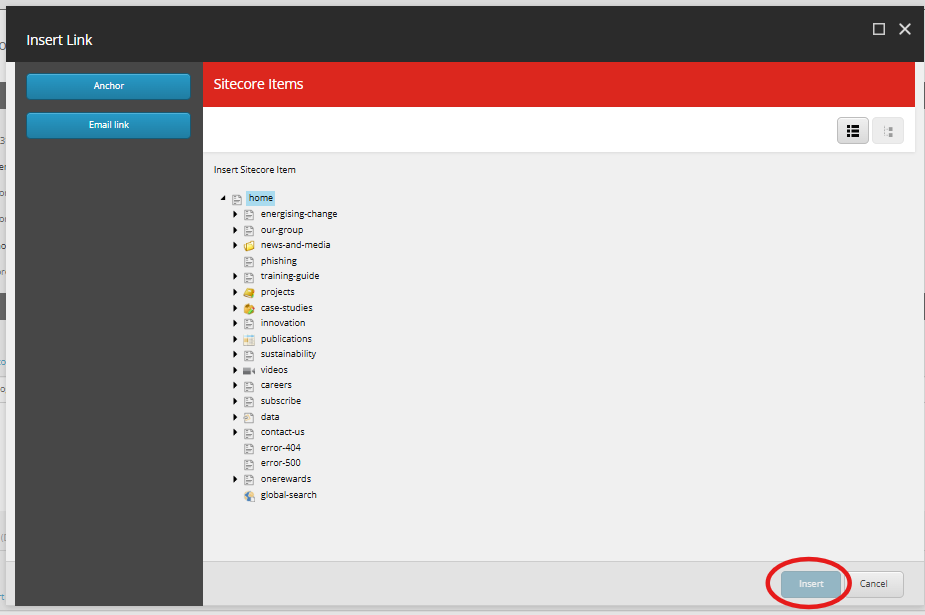
  4. Update the URL field if required, by clicking on Insert link.

  5. In the Insert Link dialogue window, navigate to the page in the content tree you want to link the logo to, and click Insert.
  6. Save and publish your changes.
CIMIC
Generating sustainable returns by delivering projects for our clients while providing safe, rewarding and fulfilling careers for our people.
Contact us
  • Enquiries
    • Privacy Policy
      • Privacy Collection Statement
        • Ethics line
          • Cyber fraud
            Latest news
            • Subscribe to our newsletter
              Work with us
              • Job search
                • Graduate program
                  • Undergraduate program
                    • Suppliers and partners
                      Copyright © 2026 CIMIC Group